If you have taken a closer look at your website’s tracking for marketing or analytics purposes, you’ve probably come across SGTM. But what is it, and why is it so important to WordPress users?
SGTM meaning: Server-side Google Tag Manager is a way to track and collect data on your own server, instead of in the browser.
Since I started in the marketing industry, I have seen the many benefits of Server-Side Google Tag Manager on WordPress websites.
It could increase your data accuracy, assist with regulatory compliance, and even improve page performance.
What Does SGTM Mean?
SGTM, as we have already mentioned, stands for Server-Side Google Tag Manager. It is an advanced tag management system that has been developed by Google.
The classic GTM used to track data from the client side, or the user’s browser. With SGTM, this tracking moves to your own server.
You avoid the loss of data caused by things like ad blockers, denied cookies, or the privacy policies of browsers like Safari’s Intelligent Tracking Prevention (ITP).
You can use the increased data accuracy for basic analytics or to send feedback to algorithm-driven ad networks, increasing your ROI.
How Does Server-Side Google Tag Manager Work?
Here’s how the Server-Side GTM works behind the scenes:
- Users interact with your website in some way, creating an event (like a page view, form submission, or purchase).
- A tracking event is sent from the browser to your SGTM server container.
- The server processes, filters, and even modifies the event data based on the rules you set up.
- It then forwards any required information to your analytics or ad platforms.
Hosting and Setup
You are going to need some sort of hosting for SGTM to work. Google Cloud Platform (GCP) and Amazon Web Services (AWS) are good options if you don’t have your own server.
Once you have your hosting, configure a “tag gateway”. This is what receives events from your website, validates them, and sends them out securely.
Integration with WordPress
To help you route your front-end events into your SGTM container, you could use a plugin like GTM4WP (Google Tag Manager for WordPress)

The heavy lifting can then happen on the server-side.
Server-Side GTM vs Client-Side GTM
As you will have figured out from the setup process, there are several key differences between server-side GTM and client-side GTM. We’ll cover what you could consider an advantage and a disadvantage when using server-side GTM for WordPress further below, but here is a brief summary:
| Feature | Client-Side GTM | Server-Side GTM |
|---|---|---|
| Where it runs | Browser | Server |
| Data control | Limited | Full |
| Privacy | Cookie-based | First-party |
| Performance | Can slow down pages | Faster load times |
| Implementation | Simple | Complex |
| Reliability | Affected by blockers | Consistent |
SGTM Features
SGTM has several technical advantages that make it stand out from traditional GTM.
Tag Management and Execution
You run all your marketing tags centrally, on your server, instead of in the browser itself, which ensures that they fire consistently.
We’ve already mentioned how user blocking scripts or rejecting cookies would not affect data, as it would in client-side data collection.
Data Processing and Forwarding
Before data leaves your domain, you alter it. In many cases, I have seen companies do this through enrichment, adding information such as IP addresses, user journey data, and other relevant analytics and marketing data.
In some cases, the alterations could be to anonymize your data. To do this, you would strip personal information before sending it to third parties.
This flexibility supports Data Collection Point (DCP) Tracking, where you (not Google) define exactly how and where data flows.
Advanced Tracking
Server-side tracking lets you use deeper integrations like internal databases or CRM systems.
From what I have seen, these integrations usually play a massive role in data enrichment.
You can combine client-side and back-end data, customize event models, or apply logic that would not have been possible in browser-based GTM.
If you are using Google Cloud for hosting, you can connect directly to Google Cloud services like Firebase and BigQuery for even more advanced analytics.
Advantages of Server-side Google Tag Manager
There are many benefits to SGTM, many of which we have briefly touched on or alluded to already.
Enhanced Data Privacy and Security
SGTM ensures that sensitive information never leaves your controlled environment without your approval. You decide what to send and what to anonymize.
This makes compliance with GDPR, CCPA, and similar regulations much easier.
Improved Website Performance
Because tags don’t constantly execute in the browser, pages load faster.
I’ve found that this is especially noticeable on WordPress sites with multiple marketing scripts.
Page speed is essential for keeping users on your site, and even plays a role in search engine rankings.
More Accurate Data Collection
As we’ve already mentioned, by processing events server-side, you prevent data loss from ad blockers or browser restrictions.
That means the data you see in GA4 and Meta Ads Manager actually reflects reality, so you are able to make better decisions and send more accurate feedback to ad campaigns.
Greater Control Over DTA
You can selectively forward only the data you need.
Want to exclude user IPs or session data? Filter them out. Want to include information about their page journey? Enrich your data.
This control allows you to get the most out of your data now, but also sets you up for success as you grow and can adjust to your shifting needs.
Disadvantages of Server-side Google Tag Manager
No tracking method is perfect, and if you decide to use SGTM, there are a couple of issues you need to be aware of.
Complex Implementation
To set up SGTM, you are going to need to create and manage a dedicated server container, connect it to your web container, and configure secure communication channels.
It’s a very complicated process if you compare it to alternative methods that, for example, just require a plugin installation.
Cost and Resource Requirements
Running a tagging server means that you need to think about hosting and maintenance costs.
Setting up your server environment is not a one-time thing either. You will need to continuously invest time into periodic updates and monitoring to ensure performance and compliance.
Continued Technical Expertise Requirements
The complicated setup means you’re going to need someone who is familiar with server infrastructure, networking, and API management.
In my experience, most marketing teams don’t have this kind of knowledge.
You could hire a developer temporarily, but troubleshooting later isn’t as straightforward as in client-side GTM either, so you may need to find a way to keep any new talent available long-term.
Dependence on Community Connectivity
Google provides official tag templates for major integrations like Google Analytics 4 (GA4) and Google Ads.
But there are many popular platforms that don’t have these official templates. In these cases, you will have to rely on community-developed connectors, shared on platforms like the GTM Template Gallery or GitHub.
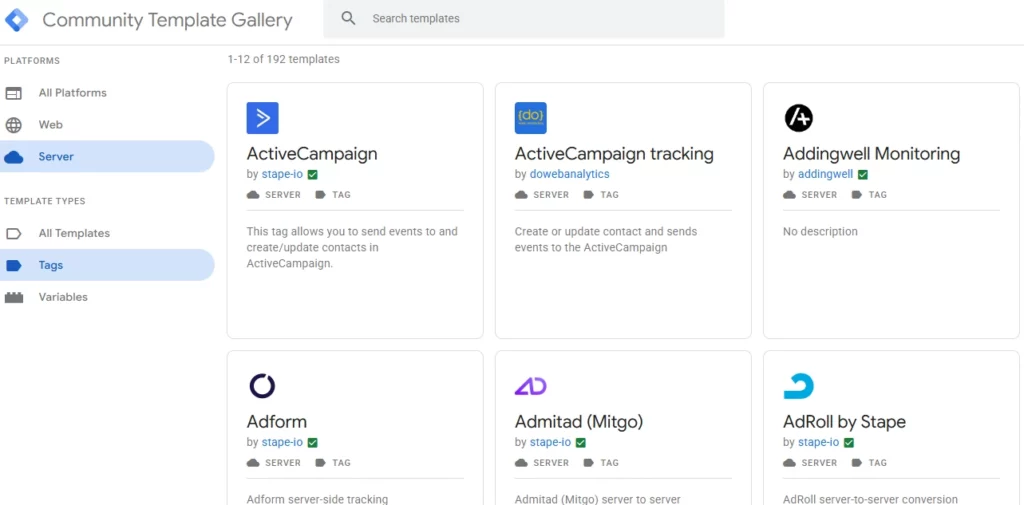
These open-source templates are useful, but they aren’t maintained by Google, and they aren’t always secure or compliant.
Compliance Challenges
Data sovereignty is a big factor in regulations lately, especially for EU companies. The new rules that come out, or even changes to existing rules, can create issues if you are implementing Server-Side Google Tag Manager.
For example, under Schrems II, U.S.-hosted data transfers were deemed risky.
The new Data Privacy Framework (DPF) has temporarily resolved this, but it could be overturned like Safe Harbor and Privacy Shield before it.
Server-Side GTM vs Traculo
If you want server-side accuracy without the technical overhead, a plugin like Traculo is a great option.
SGTM gives you full flexibility, but also full responsibility. You need to host, configure, and monitor it yourself.
Traculo, by contrast, delivers the same accuracy and privacy benefits without the technical setup.
It lets you capture events directly from your WordPress site, normalizes them, retries any failed calls, and logs every transaction for transparency. Everything happens automatically, so your analytics platforms and ad networks get the most complete data set possible, in a secure and GDPR-compliant way.
Traculo supports most major networks like GA4, Meta CAPI, TikTok, and LinkedIn. All you need to do is install the plugin, sign up, and get started.
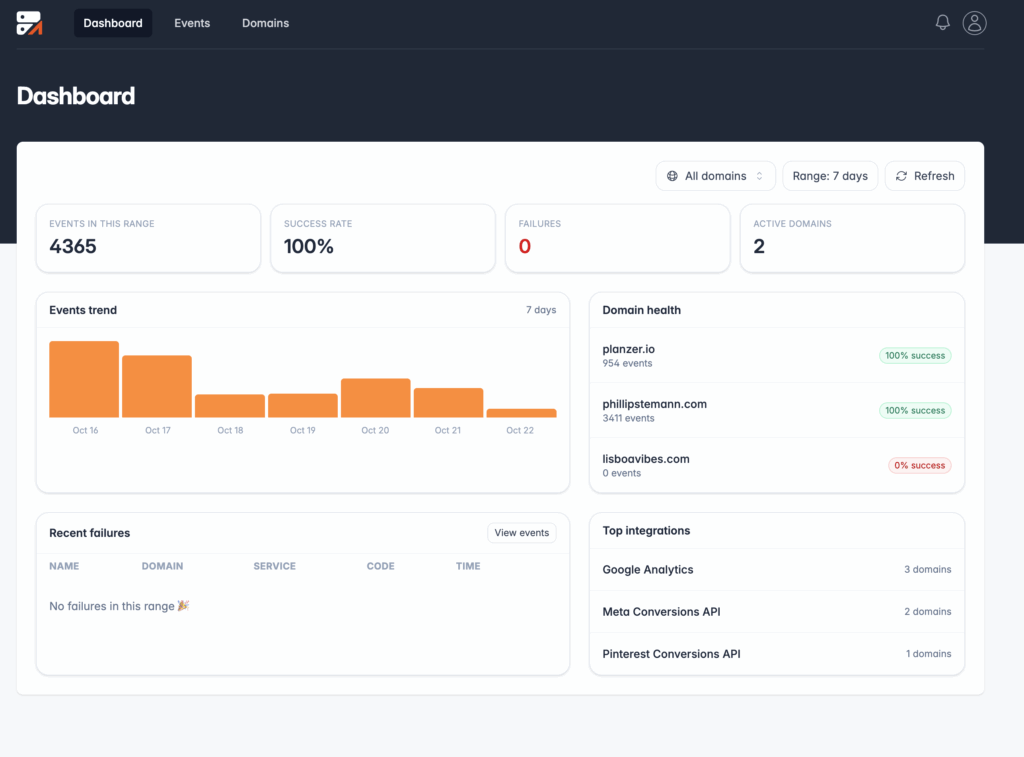
Pricing is event-based, with a generous free plan that covers up to 2,000 tracked events per month, making it a great option for smaller websites. And, if you want to track more, Traculo offers a 14-day free trial on larger plans, so you can decide if it is a better option for you before committing.
Wrap-Up
Server-Side Google Tag Manager gives you control, accuracy, and better compliance in an era of privacy-first marketing. But you need to think about the long-term technical requirements and the ongoing cost associated with hosting.
If you want the benefits of SGTM without the complexity, Traculo is a great option! You’ll get validated, privacy-compliant event delivery across every channel, straight from your WordPress site.
Sign up for Traculo to implement server-side tracking for WordPress today!
FAQs
What does SGTM mean?
SGTM means Server-Side Google Tag Manager. It’s a version of Google Tag Manager that runs on your own server instead of inside the visitor’s browser, and helps you collect, clean, and forward data more securely.
How is server-side GTM different from the regular GTM?
Server-side GTM differs from regular GTM because it processes data on a server rather than in the browser. This reduces reliance on cookies, improves data accuracy, and helps protect user privacy.
Do I need SGTM for my WordPress website?
Whether you need server-side Google Tag Manager for your WordPress website depends on your setup.
If you run eCommerce tracking or rely on ad networks like Meta, TikTok, or LinkedIn, SGTM can prevent lost conversions and ensure accurate analytics.
Is SGTM free to use?
SGTM is free to use within Google Tag Manager itself, but you’ll still pay for server hosting.