- Server-side GA4 from WordPress usually means the Measurement Protocol: your server sends an HTTP request with a
client_id, a list of events and an API secret. Google designed it to augment tag-based collection, not replace it. - Two fields decide whether a server hit looks like part of a real visit:
client_idmust match the one the GA4 tag created on your site, andsession_idties the hit to a session. - The live endpoint does not return an error for a malformed event. Test every payload on the validation server first.
- The protocol cannot collect pageviews, scrolls or clicks on its own, and it does not trigger the event-creation rules you set in the GA4 interface.
Last updated: 7 October 2026
You are here because GA4 is missing conversions, or because you want a purchase or lead to reach Google Analytics even when the browser tag failed. The answer is usually the Measurement Protocol. This article shows how a server-side GA4 hit is built, which fields matter, what the protocol cannot do, and how to prove your events arrived.
If you are still deciding whether server-side tracking is right for you at all, start with the beginner’s guide to server-side tracking. If you want the Tag Manager route, the sGTM explainer covers it. This guide is for the direct route: WordPress sends events to GA4 itself.
Two meanings of “GA4 server-side”
People use the phrase for two different setups:
- GA4 through a server-side Tag Manager container. The browser sends hits to your tagging server, which forwards them to Google. You configure clients and tags in Tag Manager.
- GA4 through the Measurement Protocol. Your WordPress site, a plugin or a forwarding service calls Google’s collection endpoint directly with a JSON body. No container is involved.
This article is about the second. Google’s own troubleshooting page notes that events sent through a server-side Tag Manager container do not go directly to the Measurement Protocol endpoint, so they lack some features, such as deriving geographic and device information the way direct hits can. The two routes behave differently, and mixing their advice is a common source of confusion.
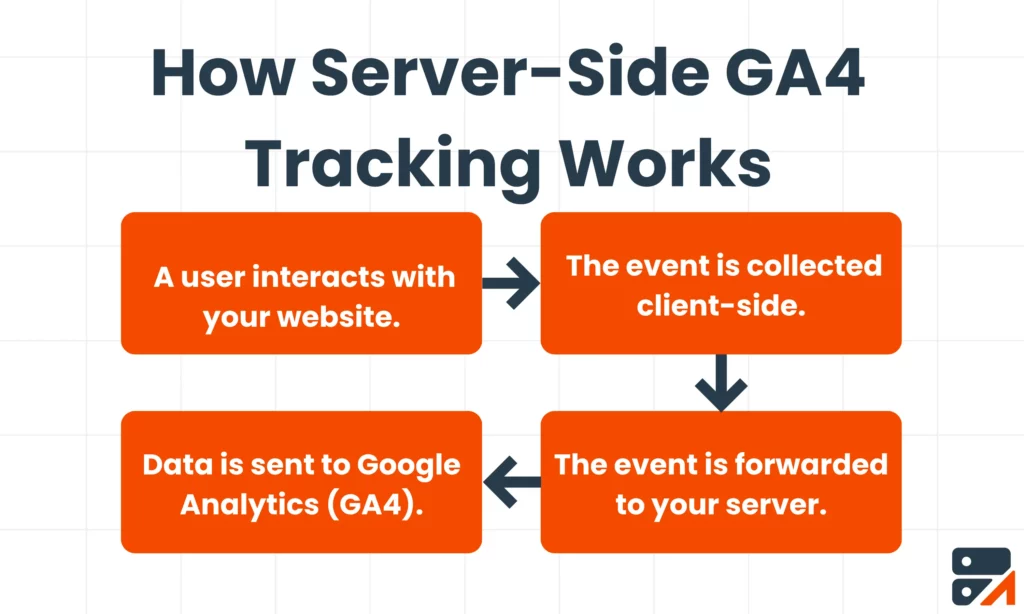
Anatomy of a Measurement Protocol hit
A web-stream hit is an HTTPS POST to https://www.google-analytics.com/mp/collect. Two values go in the URL, and the body carries the user and the events. According to Google’s reference:
-
measurement_idin the query string: the ID of your web data stream. -
api_secretin the query string: a secret you create in the GA4 interface under Admin and Data Streams. -
client_idin the body: a unique identifier for the user or browser. -
eventsin the body: an array, with up to 25 events per request.
A purchase from WordPress looks like this:
POST https://www.google-analytics.com/mp/collect?measurement_id=G-XXXXXXXX&api_secret=YOUR_SECRET

{
  "client_id": "123456.789012",
  "events": [{
    "name": "purchase",
    "params": {
      "session_id": "1791000000",
      "engagement_time_msec": 100,
      "transaction_id": "T-1042",
      "value": 59.00,
      "currency": "EUR"
    }
  }]
}
The transaction_id, value and currency fields are the usual purchase parameters. Treat them as your own convention to check against the events reference.
client_id: the field that makes or breaks the hit
For web streams, Google says the client_id should match the ID generated by the Google Analytics tag on your website. If your server invents a random one, GA4 sees a new, unrelated user. The purchase lands in reports, but it is not connected to the visit, the campaign or the page views that produced it.
So the WordPress side has to do three things:
- Read the
client_idin the visitor’s browser while they are on the site. - Store it with the thing you will report later, such as WooCommerce order meta or a hidden form field.
- Send the stored value when the order is paid or the lead is qualified.
If a visitor has no GA4 tag cookie because they blocked it or declined consent, you have no real client_id to send. Do not fabricate one to fill the gap. Whether you may send a hit at all in that case is a consent question, covered in Consent Mode v2 on WordPress.
session_id and engagement_time_msec
Two parameters shape how the hit shows up in session-based reports:
-
session_ididentifies the session. Google’s use-case guide says to include it for session attribution and to send the request no later than 24 hours after the start of the online session. With it, the event can inherit session attributes such as geography, source, medium and campaign. Per the sending guide, creating a newsession_idcreates a new session without sendingsession_start. -
engagement_time_msecis the engagement duration in milliseconds. Google says to include it along withsession_idto keep session and engagement metrics accurate, including in Realtime. Events without these parameters may not be fully reflected in Realtime user counts.
The practical rule: capture session_id in the browser next to client_id, store both, and send a purchase within a day of the session. Later purchases still arrive, but they may not inherit the original session’s attributes.
What the Measurement Protocol cannot do
This is where most disappointment comes from. According to Google’s documentation:
- It does not replace tagging. The intent is to augment automatic collection through gtag, Tag Manager and Firebase. If you rely on the protocol alone, only partial reporting may be available.
- It does not run your event rules. Rules for creating or renaming events in the GA4 interface are not triggered by Measurement Protocol events. Send the final event name you want.
- It does not collect pageviews, scrolls or clicks by itself. It sends only the events you build. Those still come from the browser tag.
-
It has reserved names. You cannot use names such as
session_start,user_engagement,ad_clickorfirst_open, and parameter names cannot start with_,firebase_,ga_,google_orgtag.. - It has size limits. Up to 25 events per request, a payload under 130 KB, up to 25 parameters per event, event and parameter names up to 40 characters, and parameter values up to 100 characters on standard properties.
-
It has time limits. Events can be backdated with
timestamp_microsby up to 72 hours. Events received more than 48 hours after the original client-side event may not be processed as expected for conversion attribution. Google also lists windows for audience and ad-platform export use cases (30 days for web audiences, 63 days for exports).
The full list of limits will get its own cheat sheet: GA4 Measurement Protocol limits. What matters here is the design consequence: your server should send a small number of meaningful events, not mirror the browser.
WordPress specifics
Where the events come from
Send from the places in WordPress where something definitely happened. For a lead form, that is the save or submit action. For a shop, it is the order status change to paid, not the thank-you page. The page can be reloaded or never reached, as the missing data article explains. Our WooCommerce server-side tracking guide goes through purchases, refunds and subscriptions.
Page caching
If a cache serves the same HTML to everyone, any client_id or session_id you print into the page will be stale. Read these values in JavaScript at run time and store them through an AJAX request or a hidden field filled after load.
Avoiding double counts
If the browser tag also fires purchase on the thank-you page, the property can record the same order twice. Decide which source owns each event. Send a transaction_id with purchases so you can spot duplicates in reports. Ad platforms use the same idea under another name; Meta’s event_id rule is the clearest example.
Secrets
The api_secret belongs on the server. Never print it into page source or a JavaScript file. Google notes in its troubleshooting page that a secret can be revoked by another user with access, and that it is case-sensitive, so keep a record of who created it.
How Traculo forwards events to GA4
Traculo is the plugin route for this. You install the WordPress plugin, add your domain API key, and events are forwarded from Traculo’s servers to Google Analytics 4 through the Measurement Protocol. The same events can also go to Meta Conversions API, Google Ads offline conversions, LinkedIn, TikTok, Snapchat, Pinterest and Plausible.
For each event, Traculo keeps a delivery log showing the response from each integration, with a success or error status, and you can export it as CSV or JSON (up to 5,000 events per export). That log is the thing to read when GA4 reports do not match: it shows what was sent and what Google answered. Traculo is not a Tag Manager server host and does not replace Tag Manager where you need custom clients or tag templates.
Debugging a setup that shows nothing
Start with the validation server
Google provides a validation server at https://www.google-analytics.com/debug/mp/collect. Send the same payload there and you get a JSON response with a validationMessages array. Each entry has a fieldPath, a description and a validationCode, such as NAME_RESERVED or VALUE_OUT_OF_BOUNDS. Events sent there do not appear in reports.
Two limits matter. First, the live endpoint does not return HTTP error codes for malformed events, so a 2xx response proves nothing. Second, the validation server does not validate your api_secret, so a clean validation can still hide a wrong secret.
Then check the usual suspects
Google’s troubleshooting page lists the causes of events not showing up:
- The
api_secretis wrong, copied for a different stream, revoked, or has the wrong case. - The
measurement_idbelongs to a different data stream. - The
client_idis missing.advertising_idis not supported as an identifier.
What about DebugView?
Google’s DebugView help page describes enabling debug mode through Tag Assistant, a debug_mode parameter in gtag.js, or the Tag Manager configuration. It does not say whether Measurement Protocol events appear there, and we could not confirm it, so use the validation server and the Realtime report for server-side hits.
Common mistakes
- Treating a 2xx as success. It is not. Validate payloads first, and compare totals afterwards.
-
Using a random
client_id. The hit counts, but as a stranger. -
Sending
page_viewfrom the server for pages the browser already tracks. You will inflate pageviews. -
Using a reserved event name such as
session_start. - Expecting GA4 interface rules to rename your events. They do not apply.
- Sending hits late. A purchase sent days later loses session attribution, and conversion processing can suffer after 48 hours.
- Forgetting consent. Sending from the server does not remove the need to respect the visitor’s choice.
- Leaving test traffic in. Use a separate stream or filter for your own tests.
Verification checklist
- Create the API secret under the right data stream and note which stream it belongs to.
- Send a sample payload to
/debug/mp/collectand fix every validation message. - Confirm that
client_idandsession_idare real values captured from the browser, not placeholders. - Send one real test event to the live endpoint and watch GA4’s Realtime report.
- Check the same event in your sending log (in Traculo, the event’s delivery log shows the response per integration).
- After a few days, compare order or lead counts in WordPress with GA4 key events. Some gap is normal; know why.
- Check that the browser tag is not counting the same conversion a second time.
For longer-term accuracy, also read how GA4 limits and samples data in GA4 data thresholds, sampling and retention, and how engagement is defined in bounce rate versus engagement rate.
Frequently asked questions
Do I still need the GA4 tag on my site if I send events server-side?
Yes, in most cases. Google says the Measurement Protocol is meant to augment automatic collection through gtag or Tag Manager, and reporting may be only partial without tagging. The browser tag provides pageviews and the client_id and session_id your server hits depend on.
What is the difference between the Measurement Protocol and server-side Google Tag Manager?
The Measurement Protocol is an HTTP endpoint you call directly with a JSON payload. Server-side Tag Manager is a container you host that receives browser hits and forwards them. They can feed the same GA4 property, but they are set up and debugged differently.
Why does GA4 show my server-side purchase as a separate user?
Most likely the client_id in the server hit does not match the one the GA4 tag created for that visitor. Capture the real value in the browser and send it with the event.
How long after the visit can I send the event?
For session attribution, Google says to send the request no later than 24 hours after the session start. Events can be backdated by up to 72 hours, and other use cases have longer windows listed in the documentation.
Related reading
- Server-side tracking for WordPress: a beginner’s guide
- What is server-side Google Tag Manager (sGTM meaning)
- Server-side tracking without GTM on WordPress
- Why is your WordPress analytics data missing?
- Meta CAPI deduplication: event_id explained
To send WordPress events to GA4 without building the integration yourself, see Traculo’s integrations. The free plan covers 10,000 events a month.