
Features
Everything you need to understand and grow your site.
Traculo combines website analytics and server-side conversion tracking in one calm, fast workspace.
The toolkit
Five ways Traculo works for you.
Use them together, or start with the one you need most.
Website analytics
Traffic, sources, pages, location and tech, with realtime, comparisons and saved segments.
Server-side events
Forward conversions from your server with a full delivery log for every event.
Goals and funnels
Goals, custom funnels, dropoff and the paths people take before they convert.
Integrations
GA4, Meta, Google Ads, LinkedIn, TikTok, Snapchat, Pinterest, Search Console, Bing and Plausible.
Teams and reports
Unlimited domains, team roles, weekly and monthly email reports and in-app notifications.
A closer look
Each feature, at a glance.
A peek at what each part of Traculo looks like.
Illustrative data
01
Website analytics
Traffic, sources, pages, location and tech, with realtime, comparisons and saved segments.
Illustrative data
02
Server-side events
Forward conversions from your server with a full delivery log for every event.
Illustrative data
03
Goals and funnels
Goals, custom funnels, dropoff and the paths people take before they convert.
Illustrative data
04
Integrations
Eight forwarding destinations, plus Search Console and Bing for search data.
Illustrative data
05
Teams and reports
Unlimited domains, team roles, weekly and monthly email reports and in-app notifications.
Integrations
Eight destinations, plus Search Console and Bing.
Forward events to the platforms you already use, and bring search data in.
At a glance
The numbers that matter.
10,000
free tracked events every month
8
forwarding destinations
Unlimited
domains on every plan
24 months
data retention on paid plans (3 on free)
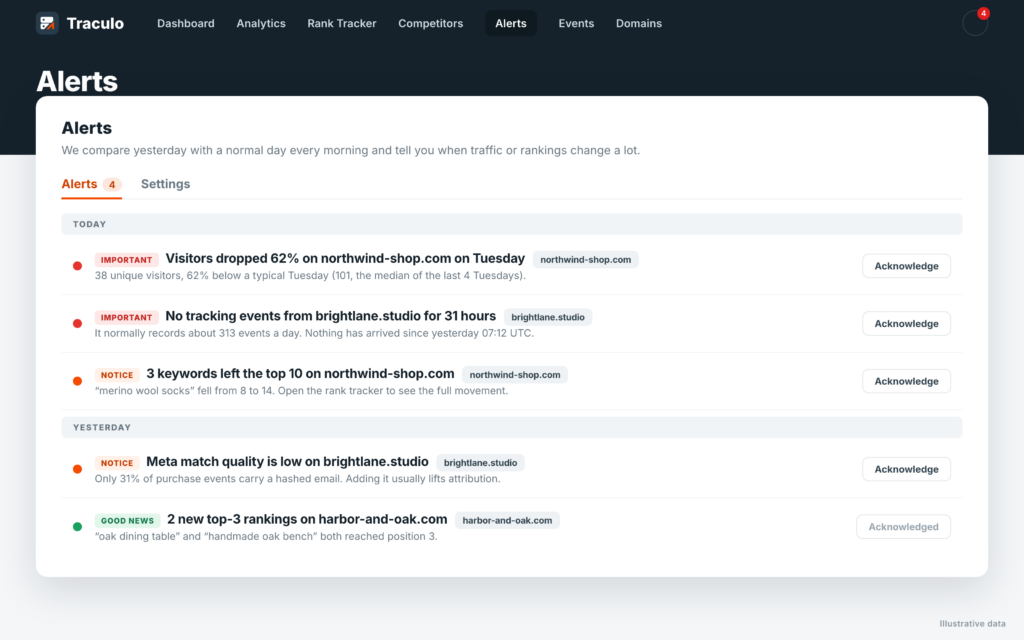
Anomaly alerts
A calm daily check, not a wall of notifications
Every morning Traculo compares yesterday with a typical day of the same weekday. If something moved a lot, you get an alert with the numbers. If nothing did, you hear nothing.
📉
Traffic drops and spikes
Visitors well below or above a normal Tuesday, with the figures behind it.
📡
Tracking goes silent
If a website that usually sends events stops sending them, you hear about it the same day.
🔔
Bell plus one email a day
A bell in the app and one email per website per day, never one per alert.

CRM to ad platforms
Tell Meta, Google and LinkedIn which leads became customers
When a deal reaches the stage you choose in your CRM, Traculo sends it back as an offline conversion, so the ad platforms learn from real revenue.
✓ Meta Conversions API, Google Ads and LinkedIn
✓ Pick the CRM stage that counts as a win
✓ Delivery log with automatic retry and manual resend
New · Server-side Tag Manager
Your Tag Manager server container, hosted for you.
Paste your container config, press Create, and Traculo runs it. There is no server to rent, update or watch.
Running in minutes
Create the container from the domain page and use the address Traculo gives you, or serve it from your own sub-domain such as ss.yourshop.com. Start, stop and restart it from the same page.
Built to get past blockers
Power-ups like Custom Loader, Cookie Keeper and Click ID Restorer keep your measurement scripts, cookies and ad click ids working in browsers that block or shorten them.
See what it does
A Domain Tracking Score, daily request counts against your plan and a log of what your server tags sent on, with the destination and the answer.
New · Guided setup
One question, then one small step at a time.
Open a domain in Traculo and the setup tour asks if you use Google Tag Manager. It then shows only the steps for your way of working, and checks each one as you go.
I use Tag Manager
Import the ready-made web and server container files, point them at your server container and run the test step. Traculo tells you when a visit has reached the container.
I do not use Tag Manager
Take the Traculo way: install the plugin or the script, send a first visit and see it arrive. The tour shows your API key and site ID right where you need them.
New · AI assistants
Ask your AI assistant about your traffic.
Connect Claude, ChatGPT, Codex or Cursor to your Traculo account. Ask how last week went, which pages bring visitors or why an alert fired, and get answers from your own numbers.
Real numbers, not guesses
The assistant reads your overview, top pages and sources, realtime visitors, events and alerts, and says which period each number covers.
You approve the connection
Settings has a ready prompt and the steps for each assistant. You approve the connection on a Traculo page before anything is shared.
Notes on your charts
If you allow it, the assistant can add a note to a chart, such as a campaign launch, so the team sees why a line moved.
Ready to see it with your own data?
Start on the free plan. No credit card required.