
Server-side event tracking
Send conversions from your server, not your visitors' browsers.
Install the WordPress plugin and Traculo forwards your events to Google Analytics, Meta, Google Ads and more, with a full log of every delivery.
page_view
GA4 · 200
Meta · 200
add_to_cart
GA4 · 200
Meta · 200
TikTok · 200
purchase
GA4 · 200
Meta · 200
Google Ads · 400
generate_lead
GA4 · 200
LinkedIn · 201
sign_up
GA4 · 200
Pinterest · 401
Sample data for illustration
How it flows
From your server to every platform, with a receipt.
The plugin sends the event from your WordPress site to Traculo. Traculo forwards it and records the response from each platform.
Illustrative data
What you get
Reliable events, and proof they arrived.
Server-side forwarding is only useful if you can verify it. Traculo shows you every event and every response.
WordPress plugin
Download the Traculo WordPress plugin, paste your domain API key under Settings, Traculo, and you are tracking. No code to write.
Server-side forwarding
Events are sent from Traculo's servers to your connected platforms, so delivery does not depend on the visitor's browser.
Delivery log
Open any event to see each integration it was sent to and the response code that came back.
Health dashboard
Events in range, success rate, domain health, recent failures and top integrations on one screen.
Search and filter
Filter events by type, status and integration. Find the failed ones in seconds and clean up in bulk.
Export your data
Get events as CSV or JSON by email, up to 5,000 events per export.
Look inside
Every event, every response, one click away.
Filter the list, open an event and read exactly what each platform answered.
Search and filter
Find the failed ones in seconds.
Filter events by type, status and integration. Errored events stand out, so you can fix the connection and clean up in bulk.

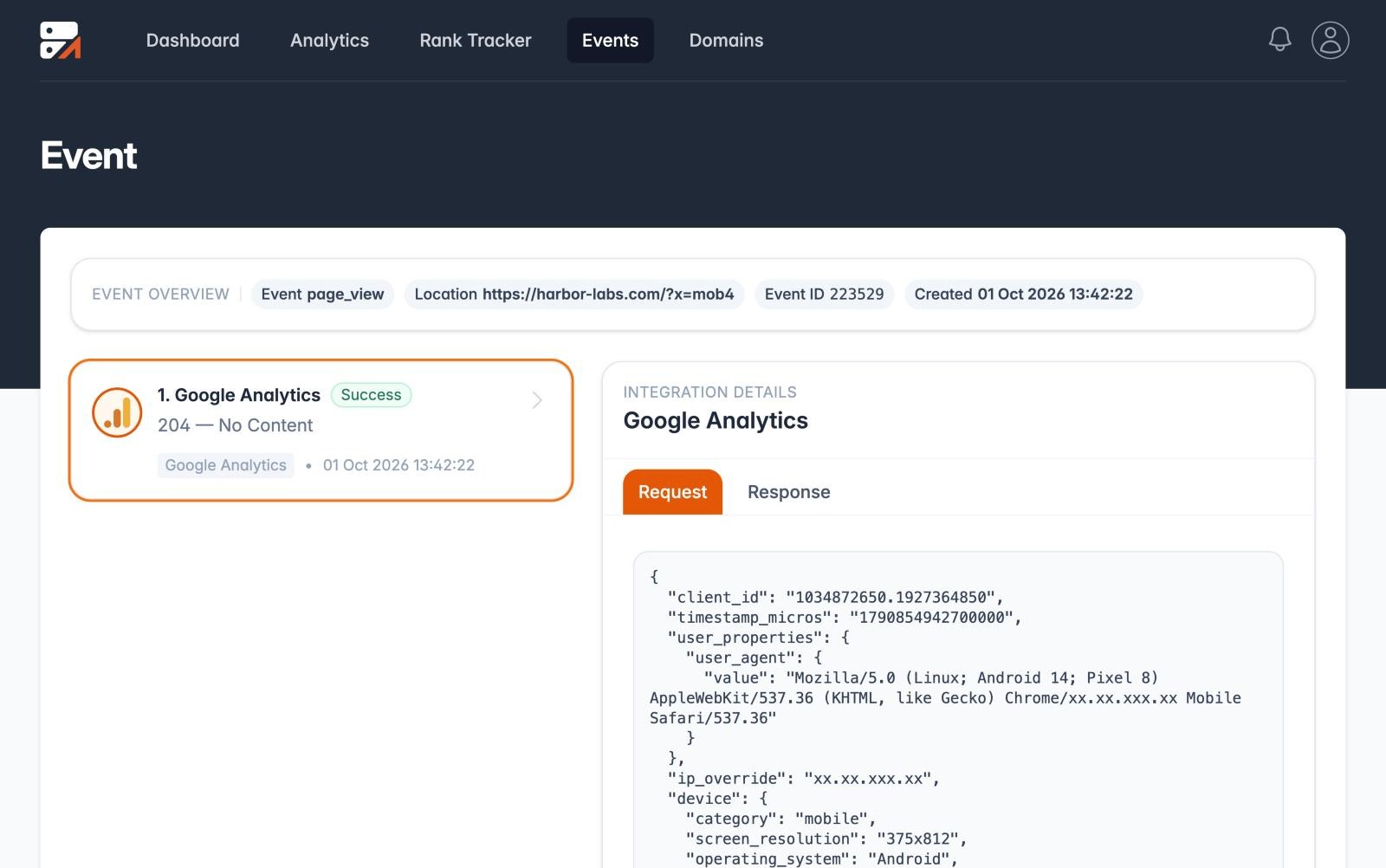
Event detail
See what was sent, and what came back.
Open an event to read the request and the response for each integration. Personal user data such as email is hashed before it is sent to platforms that expect it.
Illustrative data
Two ways to track
See what reaches your platforms, and what doesn't.
Browser tags depend on the visitor's browser. Server-side events leave your server, and the log shows what happened to each one.
Browser-only tracking
✕ Scripts can be blocked or fail to load.
✕ Events go missing without a trace.
✕ No record of what was sent or what came back.
Server-side with Traculo
✓ Events are sent from your server.
✓ Every delivery is logged, with each platform's response.
✓ Export the log as CSV or JSON.
Simplified illustration of the two approaches.
Debug with confidence
Never wonder if a conversion made it.
Every event carries a clear success or error badge based on what each integration returned.
✓ Per-integration response codes
✓ Delivery log shows what each platform answered
✓ Unlimited integrations on every plan
✓ Rotate your domain API key any time
Server-side at a glance
Built to be checked.
8
forwarding destinations
5,000
events per CSV or JSON export
Unlimited
integrations on every plan
24 months
event retention on paid plans (3 on free)
New · Server-side Tag Manager
Already use a server container? Let Traculo run it.
On the domain page, open the Server GTM tab, paste the container config from Tag Manager and press Create. Traculo starts Google's server container for you and keeps it running.
Create and run
Pick a location, press Create, and use your tagging server address and the preview address for the Tag Manager Preview button. Start, stop, restart or remove it any time.
Your own address
Serve the container from a sub-domain of your site, such as ss.yourshop.com, by adding two DNS records. Traculo handles the certificate.
Watch it work
See requests per day against your plan, the last lines the container wrote, alerts when it fails and a log of every call your tags send on.
Power-ups
Switch on what your server needs.
Each power-up is a switch with its own settings. No code, no templates to build.
Custom Loader
Serves Google's gtm.js and gtag.js from your own address, on paths that ad blockers do not recognise.
Cookie Keeper
Re-issues your measurement cookies from the server with a long lifetime. Safari caps cookies written by JavaScript at 7 days.
Click ID Restorer
Brings back ad click ids that browsers strip from the address, so conversions can still be matched to the ad.
Bot Detection
Marks or blocks crawlers, headless browsers and scripts before a tag runs.
GEO Headers and Anonymizer
Tell your tags where the visitor is, and shorten the address the container sees.
AI Traffic Detection
Tells AI crawlers and visitors who arrive from ChatGPT, Perplexity, Gemini or Claude apart from other traffic.
Google Ads connection
A server tag sends conversions to the Google Ads account you already connected in Traculo, without a developer token of your own.
POAS Data Feed
Paste what your products cost and every purchase arrives with its cost and profit.
Data Store and more
A small key and value store for server tags, a user id cookie, block by IP, request delay, schedules and an outgoing log.
Score and templates
Know how well you are measuring.
The Domain Tracking Score checks your setup and opens your homepage in a real browser to see what a visitor's browser sent. Ready-made server tag templates for the Meta, TikTok, Snapchat, Pinterest and LinkedIn conversion APIs and for Google Ads import into your container in one step.
Get your first server-side event flowing.
Free plan available. Upgrade when your event volume grows.